Learn how to use the Curlipse plug-in from Kstudio
3Ds Max plugin for creating shape objects like open/closed flat or 3D elliptical or circular spline helixes.
https://tinyurl.com/22bk3tpp
https://www.youtube.com/shorts/TP_POAlgiEI?feature=share
#3dsmax #short #a
23.02.2026 03:30 —
👍 0
🔁 0
💬 0
📌 0
https://3d-kstudio.com/product/batch-relink-application/
21.02.2026 16:40 —
👍 0
🔁 0
💬 0
📌 0
🔄 #Batch #Relink #application is an indispensable tool for organizing and managing #assets in batch mode for numerous #3dsMax files. It is a #Windows #application that does not require #3dsMax to be installed and can be run from the start menu.
Link to application
https://tinyurl.com/22kfexoo
21.02.2026 16:40 —
👍 0
🔁 0
💬 1
📌 0
https://3d-kstudio.com/product/project-manager/
17.02.2026 14:20 —
👍 0
🔁 0
💬 0
📌 0
With the ability to set up custom directory structures 🗂️ and the handy 'Search & Relink' feature for missing files 🚀, achieving a clutter-free workspace is just a few clicks away.
Say goodbye to chaos ❌ and hello to efficiency ✅ — unlock the secrets to professional asset management today!
🎥 http
17.02.2026 14:20 —
👍 0
🔁 0
💬 1
📌 0
https://3d-kstudio.com/product/project-manager/
09.02.2026 13:55 —
👍 0
🔁 0
💬 0
📌 0
➡️ 🆕 Project Manager for #3dsMax improves scene link & file organization:
✔️ Sort textures & 3D models by type/name
✔️ Exclude file types from collection
✔️ Search & Relink missing scene files
✔️ Relocate paths
Optimize your #3D workflow
https://www.youtube.com/watch?v=cbYCqpTWj9I
#CGI #3DArt #Plugin
09.02.2026 13:55 —
👍 0
🔁 0
💬 1
📌 0

PBR Material Generator- Add-on for Project Manager
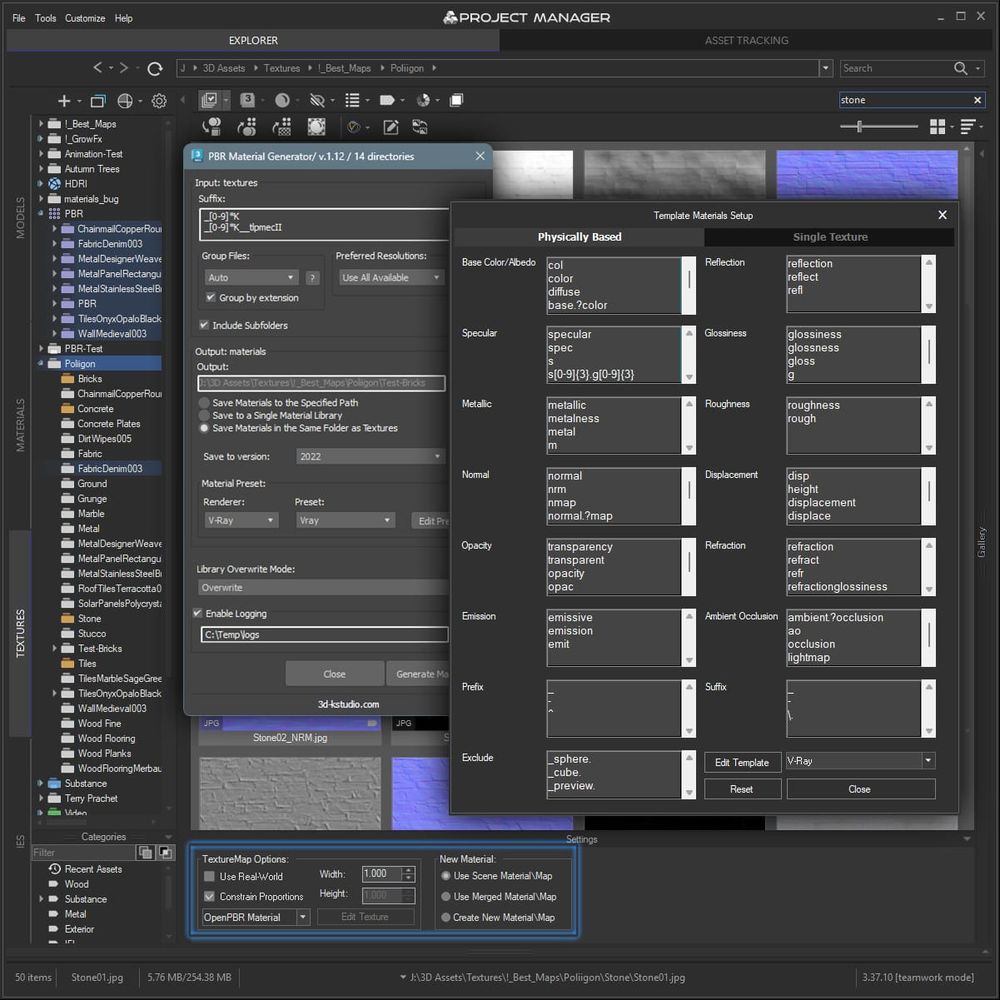
PBR Material Generator- Add-on for Project Manager
✨Quickly create #PBR #materials in bulk from #textures.
https://tinyurl.com/2d2eeu6k
Fine-tune material presets directly within Project Manager, and generate material libraries from thousands of textures in a single batch.
Supports #Vray, #Corona, #Arnold, #Redshift, #Octa
25.01.2026 16:50 —
👍 0
🔁 0
💬 0
📌 0
https://3d-kstudio.com/product/project-manager/
25.01.2026 14:05 —
👍 0
🔁 0
💬 0
📌 0
Interactive preview animated Archvision RPC with Project Manager.
Project Manager allows preview and merge Archvision RPC files to 3ds Max
https://www.youtube.com/watch?v=-HqiXYT8dpA
#Kstudio #ProjectManager #3dModel #Asset #Archvision #RPC #Merge #shorts
25.01.2026 14:05 —
👍 0
🔁 0
💬 1
📌 0
https://3d-kstudio.com/product-category/kstudio-products/sweep-profile/crown-molding/
22.01.2026 13:25 —
👍 0
🔁 0
💬 0
📌 0


Sweep Profile - Parametric Molding Modeling
Set from 393 shapes for modeling crown moldings in 3ds Max.
https://tinyurl.com/2amxhtd8
Ready to use with the plugins “Fusion” and “Sweep Profile”.
Each archive contains files in 3ds Max (version 2011) and DXF formats
https://www.youtube.com/
22.01.2026 13:25 —
👍 0
🔁 0
💬 1
📌 0
https://3d-kstudio.com/product/project-manager/
20.01.2026 17:51 —
👍 0
🔁 0
💬 0
📌 0

Convert Images in Batch

Convert & Resize Images using Project Manager
Project Manager plugin facilitates the conversion of any image to various image formats, including TX.
Most renderers now support the TX image format. Instead of loading the entire texture map into memory, a renderer can load one tile at a time as required, leading to faster texture loading times,
20.01.2026 17:51 —
👍 0
🔁 0
💬 1
📌 0
https://3d-kstudio.com/product/casings-moldings-bundle/
20.01.2026 13:36 —
👍 0
🔁 0
💬 0
📌 0

Sweep Shapes Casings-A-part-4

Moldings in interior

Casing Molding in interior
Set from 244 shapes for modeling casing moldings in 3ds Max.
https://tinyurl.com/2azbnap2
#Molding #archviz #arch #modelling #SweepProfile #3dsMax #Kstudio #casing #spline #cornice #classic
20.01.2026 13:35 —
👍 0
🔁 0
💬 1
📌 0
https://youtu.be/EkSL_TSH8Rc
18.01.2026 12:16 —
👍 0
🔁 0
💬 0
📌 0


Project Manager- 3D Asset Manager - Material Library Explorer
🌟 Easily create #Materials supports to your #renderer straight from #Bitmaps.
Just drag & drop an #image into the #Material #Editor, #Slate Mat Editor, or right onto #Model in the #viewport. 🖱️✨
https://tinyurl.com/264yxyup
https://youtu.be/EkSL_TSH8Rc
#3dsMax #Plugin #Model #Mat
18.01.2026 12:16 —
👍 0
🔁 0
💬 1
📌 0
https://3d-kstudio.com/product/project-manager/
14.01.2026 16:46 —
👍 0
🔁 0
💬 0
📌 0

Merge Proxy with Materials

Project Manager- Asset Manager - 3D Models Browser
Discover the ease of #importing #3D #models into 3ds Max as proxies with Project Manager!
It's a breeze regardless of the original model format - be it #MAX, #3DS or #FBX.
Simply drag and drop your model into the viewport or double-click to add it to the scene.
https://tinyurl.com/2yjb7rcm
14.01.2026 16:46 —
👍 0
🔁 0
💬 1
📌 0
https://3d-kstudio.com/product/smart-extrude-3ds-max-modifier-plugin/
07.01.2026 11:30 —
👍 0
🔁 0
💬 0
📌 0
🚀 Discover the Smart Extrude Plugin for 3Ds Max!
🎥 Watch Claudio's insightful video on YouTube. Intuitive extrusion, advanced features, and extrusion of complex shapes.
https://youtu.be/ziCDPnzZQrw
🌟 #3DsMax #Smart #Plugin #Extrude #Kstudio #Shape #Spline #3DModeling🛠️🌍
07.01.2026 11:30 —
👍 0
🔁 0
💬 1
📌 0
https://www.youtube.com/shorts/dojUxjtEwoo
05.01.2026 15:16 —
👍 0
🔁 0
💬 0
📌 0
1️⃣ Pick an IES
2️⃣ Drag onto your lamp geometry (or use Replace)
3️⃣ Render#Project #Manager lets you drag any IES file straight into the viewport (or one-click replace an existing bulb). It auto-builds a photometric light that matches your active render engine— #Corona, #VRay, #Arnold… you name it.
🔗 Fr
05.01.2026 15:16 —
👍 0
🔁 0
💬 1
📌 0
https://youtu.be/2MH3afl824Q
31.12.2025 13:01 —
👍 0
🔁 0
💬 0
📌 0
https://3d-kstudio.com/product/trackscripts/
25.12.2025 14:36 —
👍 2
🔁 0
💬 0
📌 0

Kstudio Scripts Pack for 3ds Max includes over 30 free scripts that can help streamline your workflow and improve your productivity


Align Pivot ( Smart )

Align Pivot to Face ( Mouse point )
Kstudio Scripts Pack for 3ds Max includes over 30 free scripts that can help streamline your workflow and improve your productivity.
-Sweep Profile
-Align Pivot
-Batch Save to Previous version and more
https://tinyurl.com/2yempg6f
#3dsMax #plugin #model #rendering #kstudio #sweepprof
25.12.2025 14:36 —
👍 2
🔁 0
💬 1
📌 0
https://3d-kstudio.com/tutorials/image-based-lighting-using-hdr-with-project-manager/
23.12.2025 14:51 —
👍 0
🔁 0
💬 0
📌 0

HDR Image Based Lighting with Project Manager

Set up your lighting in seconds by simply dragging an HDR or EXR file into the viewport.
Project Manager automatically creates a renderer-compatible Dome light for #Vray #Redshift #Octane #Final #FStorm #Arnold, and assigns the HDR map where it belongs – either to the Environment or directly to the
23.12.2025 14:51 —
👍 0
🔁 0
💬 1
📌 0