Qreates
High quality product images using AI
start generating stunning product shots for your brand: qreates.com
29.12.2024 23:27 — 👍 0 🔁 0 💬 0 📌 0
Here's how to create stunning product images with this quick tutorial 👇
29.12.2024 23:27 — 👍 2 🔁 0 💬 1 📌 0
Capturing the vibe with Qreates✨
Step 1: Upload your product image
Step 2: Upload own reference image and set strength high
Step 3: Describe your vibe example "dreamy" and roll dice
& Generate! 😍
28.12.2024 18:11 — 👍 2 🔁 0 💬 0 📌 0
Qreates
High quality product images using AI
to get started upload your product here: qreates.com
04.12.2024 18:56 — 👍 0 🔁 0 💬 0 📌 0

POPCORN! Everyone's favourite snack!🍿
To generate great shots like this for your brand, here's a quick tip:
1. Make sure you select a good reference background image
2. Set the strength high
3. Describe your vibe
Just like that, you should have a great shot!😍
04.12.2024 18:56 — 👍 5 🔁 1 💬 1 📌 0
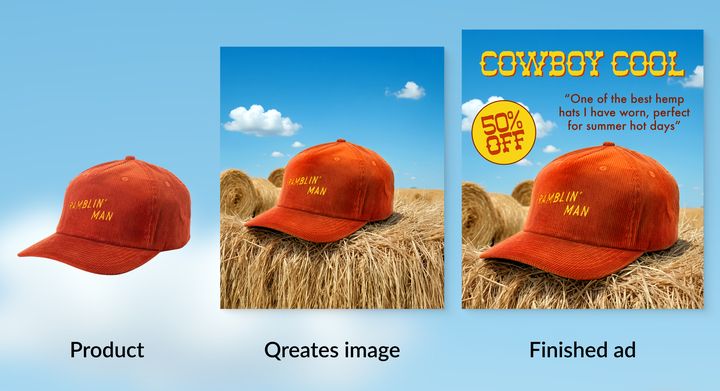
Here's a great example of how brands are using Qreates in just 3 easy steps!
Step 1: Upload your product image
Step 2: Add a reference image of your choice and roll the dice to enhance your prompt
Step 3: Generate - and voilà! You have the perfect asset for your ads! 😍
start here: qreates.com
28.11.2024 16:48 — 👍 4 🔁 1 💬 0 📌 1

✨ You can now create ads like this in time for the holidays with Qreates!
Key elements that make this ad compelling:
1. Clean composition that draws focus to the product
2. Natural pine greenery and pinecones for holiday feel
3. Seasonal but sophisticated styling
19.11.2024 18:36 — 👍 2 🔁 0 💬 0 📌 0

Another perfect example of how eCom brands are using Qreates to generate high quality ads! 😍
No expensive photographers, studios or set designers needed!
Simply upload your product image to get started!
P.S. exciting new features dropping this week!
18.11.2024 21:35 — 👍 1 🔁 0 💬 0 📌 1

Here's a great example of how brands are using Qreates in just 3 easy steps!
Step 1:
Upload your product image
Step 2:
Add a reference image of your choice and roll the dice to enhance your prompt
Step 3:
Generate - and voilà! You have the perfect asset for your ads! 😍
18.11.2024 00:32 — 👍 2 🔁 0 💬 0 📌 0