Three cartoonish green zombies stroll through a miniature felt neighborhood with small houses and fences.
#zombies
29.11.2025 01:25 — 👍 0 🔁 0 💬 0 📌 0
@jellydreams.bsky.social
✨ Live2D Rigger - Developer - AI Explorer ✨ Website: jellydreams.gitlab.io Twitter: x.com/_JellyDreams_ Youtube: youtube.com/@JellyDreams Tiktok: tiktok.com/@_jellydreams_
Three cartoonish green zombies stroll through a miniature felt neighborhood with small houses and fences.
#zombies
29.11.2025 01:25 — 👍 0 🔁 0 💬 0 📌 0Currently learning how to become a filmmaker, with a specialization in music videos
15.11.2025 17:07 — 👍 1 🔁 0 💬 0 📌 0
I love corsets 🖤
20.10.2025 04:32 — 👍 0 🔁 0 💬 0 📌 0
input : character sheet

output: screenshot MOBA game
Transforming character into MOBA hero #NanoBanana
15.10.2025 21:38 — 👍 0 🔁 0 💬 0 📌 0
Finished Product Photos (AI-Generated)
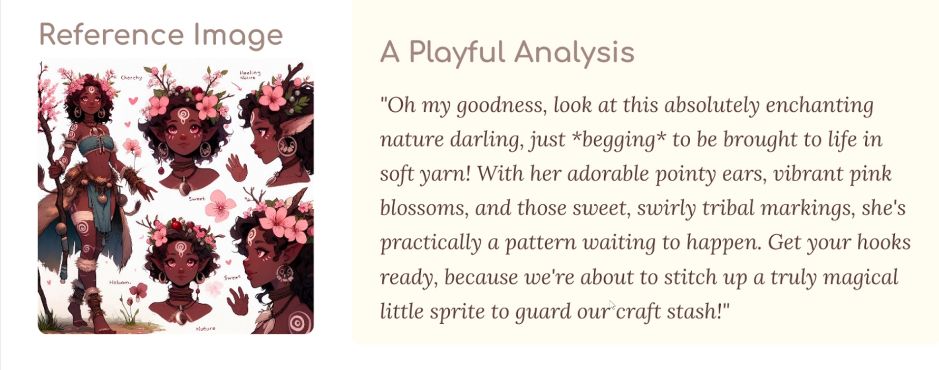
Reference image used to generate the pattern + AI-generated analysis

Materials and Instructions. Step 1 - Head: Text and diagram (AI-Generated)

Step 8 - Flowers: Text and diagram (AI-Generated)
Crochet Pattern Generator using AI:
First test result – Amigurumi Kinaara character
🧪 Experiment: Crochet Pattern Generator
From an image reference, the app generates a list of materials and step-by-step instructions illustrated with diagrams and pictures.
- App built with Google AI Studio.

Input - hand-drawn storyboard with annotations

Output - AI-generated photo
Sketching Storyboard → Photo
Nano Banana has a good understanding of annotations, making it easier to control the output with less detailed prompts 👍 #NanoBanana

Watercolor over pencil sketch
I was afraid to ruin my sketch with colors.
Then I remembered I have no obligations: this is not a school assignment, it’s not paid work, and I don’t need to rush to be good at art.
I can enjoy the process even if I fail.
Turns out I really love making shadows with watercolors.

Hand-drawn pencil sketch
Art Break: Sketching on Paper
I had a CTRL+Z hand reflex way too often.
Nano Banana Image → Veo2 #nanobanana #veo2
Dream of making my own cinematic isn’t that far away
Image to Video using Veo2 #nanobanana #veo2
09.09.2025 16:13 — 👍 0 🔁 0 💬 1 📌 0
character walking in shallow water

character shooting a bow

character eating bread

character training with a katana
More examples of the same character in different scenes using Nano Banana #nanobanana
08.09.2025 20:52 — 👍 0 🔁 0 💬 1 📌 0

Testing Nano Banana #nanobanana
AI Character Design (2024) → Photo
What do you mean it's classified as Adult Content ? 😭
Is that really NSFW ?
Running S2V (Sound to Video) Wan2.2 on my 12VRAM computer ✅
input : AI Image + AI Music
output:
She defeats monsters !
09.06.2025 20:36 — 👍 1 🔁 0 💬 0 📌 0Experimenting with Artmesh
Live2D Artist : @horrorkissen.bsky.social
#Live2D #Live2DWIP
Timelapse 1 Hour Art Session
27.02.2025 21:31 — 👍 1 🔁 0 💬 0 📌 0
Playing with "Pikaddition" feature of Pika Labs. You can insert an image reference into a video !! It's fun 😄 #AIVideo
11.02.2025 16:57 — 👍 0 🔁 0 💬 0 📌 0Brazilian Miku wants to keep you away from distractions !
11.02.2025 16:57 — 👍 0 🔁 0 💬 1 📌 0
I made a quick Live2D body movement guide.
I don't know if it makes sense, but this is how I like to rig the body parameters.
#Live2DTips

Testing my solution for automating Live2D animations based on audio. Experimenting with AI-generated podcast to bring it to life ! 🤖🎙️ youtu.be/-C6k5IGBDbY #Live2D #NotebookLM #AIPodcast
09.01.2025 11:10 — 👍 0 🔁 0 💬 0 📌 0Live2D models reacting to audio. No manual animation, no face tracking—only code ! #Live2D
09.01.2025 11:10 — 👍 1 🔁 0 💬 1 📌 0
Character portrait generated with Stable Diffusion

Character portrait generated with Stable Diffusion
Reference images used to generate the video ⬆️ (they are generated with Stable Diffusion):
22.12.2024 18:57 — 👍 0 🔁 0 💬 0 📌 0Testing Pika.art to generate videos from references, and I’m really impressed by the consistency in the details ! [See images used in the comments ⬇️] #AIvideo #Pika
22.12.2024 18:57 — 👍 0 🔁 0 💬 1 📌 0
VBridger Shapes for lipsync!
In Live2D, these are the ones that get keyed on the lips themselves
Deformers handle MouthX/Pucker/Shrug
Share your advice and tips for optimizing Live2D workfiles !
25.11.2024 07:19 — 👍 1 🔁 0 💬 0 📌 0More details in documentation:
📕 Performance Models docs.live2d.com/en/cubism-editor-manual/performance/
📕 Validate Deformer docs.live2d.com/en/cubism-editor-manual/convenient-function-deformer/
📕Parent-Child Hierarchies docs.live2d.com/en/cubism-editor-manual/combintion-of-parent-child-relation/

Screenshot of the Live2D Cubism 'Model Statistics' panel showing the number of ArtMeshes, polygons, deformers, and other elements in the project
3. Keep the numbers low for: ArtMeshes, polygons, deformers, division deformers, and deformer parent-child hierarchies to improve performance
How to debug: "File" > "Model statistic.." to check how many elements are in your project and detect unused deformers
#Live2DCubism

Screenshot of a Live2D model in Live2D Cubism with the option 'Highlight Vertices Which Stick Out From the Parent Deformer' enabled, showing invalid deformers. A red cross icon and the text 'This is not good ! The blue squares indicate child deformers sticking out of their parent'
2. Child warp deformers should be set so they don’t overhang the parent’s warp deformer.
How to debug: Use deformer validation
- Show > Highlight Vertices Which Stick Out From the Parent Deformer
- You can also display a detailed list with Modeling > Deformer > Validate Deformer
#Live2DCubism