There are several limitations compared to a fully shiny app, but I'd love to hear ideas where you this might be useful for you.
jameshwade.github.io/shinymcp/

@jameshwade.bsky.social
Analytical chemist in industry working on materials characterization and data science. Interested in #rstats, modeling, & sustainability. Owner of many pets.
There are several limitations compared to a fully shiny app, but I'd love to hear ideas where you this might be useful for you.
jameshwade.github.io/shinymcp/
shinymcp includes a pipeline that can scaffold an MCP App from an existing Shiny app. It does this by parsing and analyzing your Shiny app code to generate the shinymcp app automatically.
08.02.2026 19:53 — 👍 0 🔁 0 💬 1 📌 0The core idea is to flatten your reactive graph into tool functions.
Each connected group of inputs + reactives + outputs becomes a single tool that takes input values as arguments and returns a named list of outputs.
shinymcp swaps Shiny's JS runtime for a tiny bridge that talks to Claude Desktop. Your R functions run server-side, and results flow back to interactive widgets right in the chat window.
The same protocol is supported in ChatGPT and GitHub Copilot chat.
An MCP App has two parts: UI components that render in the chat interface and tools that run R code when inputs change.
When the tool is invoked, an interactive UI appears
inline in the conversation. Changing the inputs calls the tool and updates the output.
I built an R package that turns Shiny apps into UIs that render directly inside Claude Desktop or ChatGPT.
It's called shinymcp. Drop-downs, plots, tables all inline in the chat.
github.com/jameshwade/shinymcp
The electronic lab notebook vendors (Benchling, BIOVIA, PerkinElmer Signals) have essentially formalized the traditional workflow. Their docs/demos are a surprisingly good guide to what pen-and-paper notebooks can look like in practice.
(very curious what's driving this question)

Lots of docs here: jameshwade.github.io/dsprrr/
07.01.2026 21:05 — 👍 1 🔁 0 💬 0 📌 0
It's still early, but enough pieces are there to play around: >10 module types and optimization strategies (teleprompters). Built in bridges to vitals for evals.
Install with pak::pak("jameshwade/dsprrr")
Github: github.com/jameshwade/d...
Optimization means things like searching over prompt templates, adding few-shot examples automatically, trying different instruction phrasings, all driven by actual metrics.
07.01.2026 21:05 — 👍 0 🔁 0 💬 1 📌 0Basic workflow starts by defining a typed signature (inputs → outputs), wrap it in a module, run it against a dataset, measure with a metric, optimize until it works.
signature("question -> answer") |>
module() |>
evaluate(test_set, metric_exact_match())
It builds on the existing R ecosystem:
- ellmer for LLM calls
- vitals for evaluation
- tidymodels patterns for optimization
dsprrr is the glue that ties them into a coherent programming model.

dsprrr Programming—not prompting—LLMs in R dsprrr brings the power of DSPy to R. Instead of wrestling with prompt strings, declare what you want, compose modules into pipelines, and let optimization find the best prompts automatically. # Install pak::pak("JamesHWade/dsprrr") # That's it. Start using LLMs. library(dsprrr) dsp("question -> answer", question = "What is the capital of France?") #> "Paris" Getting Started: Configure Your LLM OpenAI Anthropic Gemini Ollama Auto-detect
My holiday project was building dsprrr, a package for declarative LLM programming in R, inspired by DSPy. The core idea is to treat LLM workflows as programs you can systematically optimize, not prompt strings you tweak by hand.
07.01.2026 21:05 — 👍 4 🔁 1 💬 1 📌 0Thank you!!!
19.09.2025 23:57 — 👍 0 🔁 0 💬 0 📌 0Introducing ensure, a new #rstats package for LLM-assisted unit testing in RStudio! Select some code, press a shortcut, and then the helper will stream testing code into the corresponding test file that incorporates context from your project.
github.com/simonpcouch/...
I’d like to learn how the boundaries of the tidyverse have changed over time. Would you consider removing a package from the tidyverse - maybe you already have?
This overlaps with @ivelasq3.bsky.social’s question I think.
Great 📦 name! Will be giving this a try for sure.
20.11.2024 00:06 — 👍 1 🔁 0 💬 0 📌 0
Jumping on the #rstats "we're so back" train 🚂
Here's two fun (unrelated) things I scrolled upon tonight:
📊 tinyplot - base R plotting system with grouping, legends, facets, and more 👀 github.com/grantmcdermo...
🔎 openalexR - Clean API access to search OpenAlex docs.ropensci.org/openalexR/ar...
Would love to be included ✨
08.11.2024 23:54 — 👍 1 🔁 0 💬 1 📌 0😍
08.11.2024 00:29 — 👍 0 🔁 0 💬 0 📌 0Update... I just pranked myself with this 🙈
Protip: restart your session when you open a new file
Worst prank *ever*
06.11.2024 01:41 — 👍 19 🔁 3 💬 2 📌 2And in vctrs no less. I used that a few months back for a side project and felt so fancy
06.11.2024 01:07 — 👍 0 🔁 0 💬 0 📌 0Do you use mirai directly or via something like crew?
06.11.2024 01:05 — 👍 0 🔁 0 💬 1 📌 0That’s a new one for me. Trying that out tomorrow
05.11.2024 23:44 — 👍 3 🔁 0 💬 0 📌 0Having a hard time focusing on code today. Instead of refreshing news sites, tell me about an R package or function that made your life easier recently?
I finally figured out how group_modify() works, and it's been a game-changer for some nested data madness. #rstats #dataBS
If you’ve been waiting try out LLMs with code, now is the time to do it.
29.10.2024 22:42 — 👍 3 🔁 0 💬 1 📌 0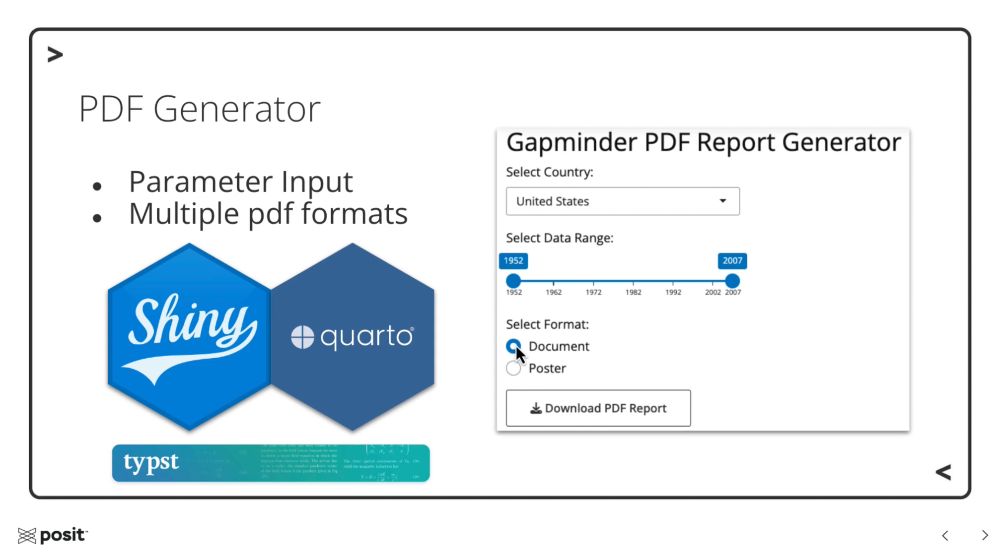
The last Wednesday of each month I host a Workflow Demo with various Posit folks 💛
Tomorrow Oct 30th @ 11am ET Ryan Johnson will share how to use #Quarto & #Shiny to create #Typst PDFs dynamically 🎉
add to 🗓️: pos.it/team-demo
I know it's during R/Pharma 😬 so please know it's recorded too!
elmer: github.com/hadley/elmer
shinychat: github.com/jcheng5/shin...
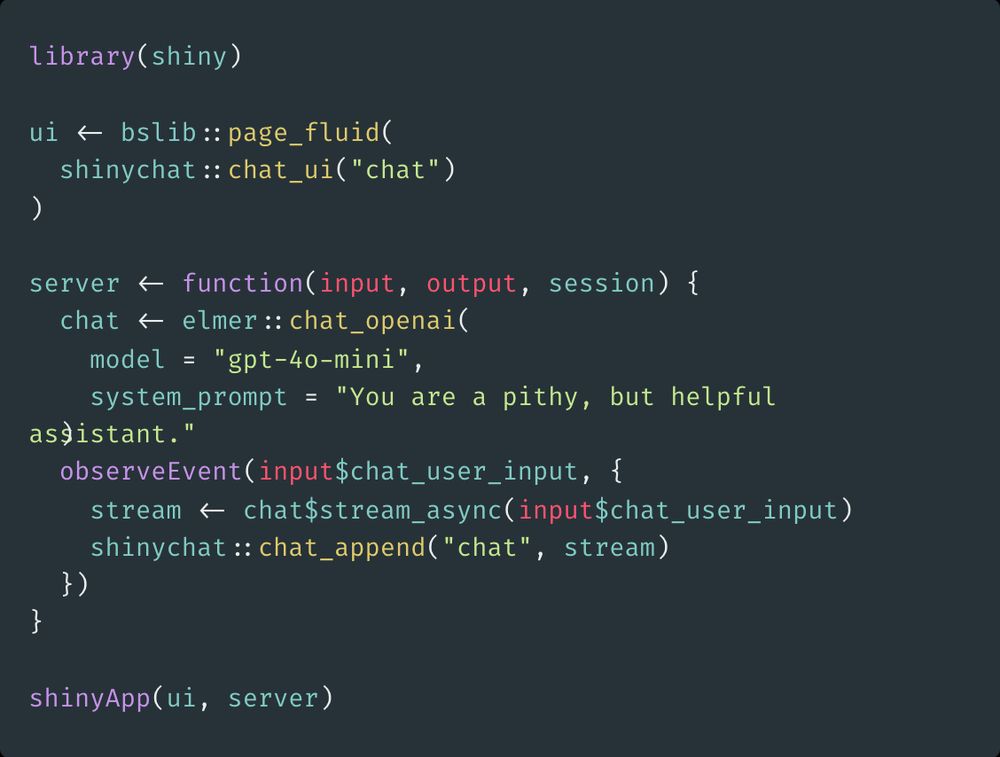
library(shiny) ui <- bslib::page_fluid( shinychat::chat_ui("chat") ) server <- function(input, output, session) { chat <- elmer::chat_openai( model = "gpt-4o-mini", system_prompt = "You are a pithy, but helpful assistant." ) observeEvent(input$chat_user_input, { stream <- chat$stream_async(input$chat_user_input) shinychat::chat_append("chat", stream) }) } shinyApp(ui, server)
You can now build a chatbot in shiny in less than 20 lines of code. shinychat and elmer make this much easier than it was even a month ago.
elmer nails LLM abstractions. Go check them out if you haven't already!