very rad!!!! 💫
04.02.2026 02:04 — 👍 0 🔁 0 💬 0 📌 0
Just finished my submission for the amazing Amply X Webflow Challenge
What do you think about the interactions in this one? 🧑🍳
This was done in #Webflow with the new @gsap-greensock.bsky.social interactions panel
#AmplyHolidayChallenge
18.12.2025 04:59 — 👍 1 🔁 0 💬 0 📌 0
very cool component @lailalalami.com
27.08.2025 05:15 — 👍 2 🔁 0 💬 0 📌 0
Sneak peek of my new @framer.com component
After some feedback from the Framer team, I'm adding a new field to make it more customizable
This free component will allow you to add 2 images and customize the pixel size, color, etc
SDG
27.08.2025 04:54 — 👍 0 🔁 0 💬 0 📌 0
This was done mainly on HTML and CSS only. With Javascript being used only for toggling a class name.
08.08.2025 16:57 — 👍 3 🔁 0 💬 0 📌 0
Original Instagram post: www.instagram.com/p/DLyt8qPCIxX/
08.08.2025 16:56 — 👍 0 🔁 0 💬 0 📌 0
UI Animation/Interaction Rebuild 2:
Untitled Folder: Interactive
This one is sort of a recreation from The Brand Identity Store after effects template
I saw this on a @codrops.bsky.social animation roundup and I thought about building something like it
Codepen:
codepen.io/tony_code/pe...
SDG
08.08.2025 16:56 — 👍 1 🔁 0 💬 2 📌 0
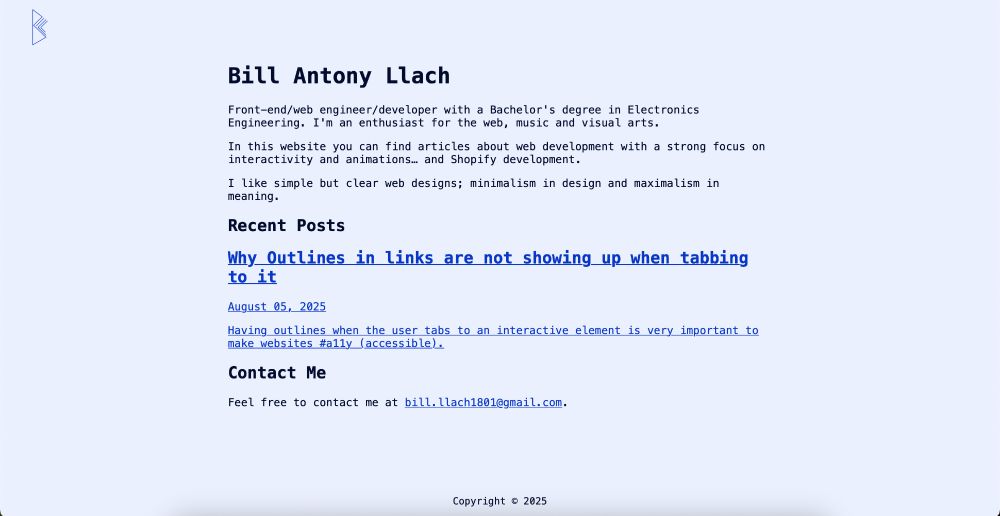
Take a look here and let me know your thoughts!
billantony.com
Tech stack:
* Plain HTML 🟠
* Plain CSS 🔵
* Jekyll -> Static site generation 🔴
* No Javascript 🙅
I like this simple approach and hope to take this initial website design a lot further down the road
Great day! ✌️
SDG.
06.08.2025 17:35 — 👍 0 🔁 0 💬 0 📌 0
Just launched my new portfolio site/blog! 🎉
After a lot of thinking and procrastination haha I finally released my personal portfolio out there in the World Wide Web
This is the first blog I truly own and I feel very happy to share the things I've learned in that way
The styles are very minimal 👇
06.08.2025 17:35 — 👍 0 🔁 0 💬 1 📌 0

Figma design of the Sundae creative website
Learning to UI design by copying masterworks. Pt. 1.
I'm recreating the design made by Locomotive agency in the website sundaecreative.com/en
I chose this one because of the compelling design b but also you get what thee website is about just by looking at the hero section
31.07.2025 22:54 — 👍 0 🔁 0 💬 0 📌 0
✨ Been waiting for this one! ✨
24 layers on the cannon, 64 balls, and not a single inline variable. All powered by sibling-index() and sibling-count().
Working with multiple elements just got way easier! 🤩
(Currently on Chromium only)
🔗 Live demo on @codepen.io: codepen.io/amit_sheen/f...
31.07.2025 16:46 — 👍 8 🔁 2 💬 1 📌 0
such a creative use case for it @amitsheen.bsky.social !!
Thanks for sharing ✨
31.07.2025 17:44 — 👍 1 🔁 0 💬 0 📌 0

Home
We strategically connect lifestyle brands with audiences who provoke, inspire, and convert.
This is screenshot is from the beautiful (and well designed) website by #Locomotive agency sundaecreative.com/en
31.07.2025 17:43 — 👍 0 🔁 0 💬 0 📌 0

how to do that effect of having the text color be the inversion of its background? 🎨
Only CSS is needed:
```
mix-blend-mode: difference;
```
On the parent element that defines the color
✌️
SDG
31.07.2025 17:41 — 👍 0 🔁 0 💬 1 📌 0
In this case, I knew this container was the one because it had a `overflow-x: hidden`
There you go! Fixed
One of my main goals is to help #Shopify merchants with their existing stores so they don't have this kind of bugs
So if you are one, feel free to reach out 👋
SDG
30.07.2025 18:09 — 👍 0 🔁 0 💬 0 📌 0
The fix is very easy! just add
`overflow-y: hidden` to the overflowing container
How do you know which one is the "overflowing container"?
Well, you can inspect and see the one that has a width bigger than the page width or the one that has a `overflow` property set
👇👇👇
30.07.2025 18:09 — 👍 0 🔁 0 💬 1 📌 0
Weird Scrollbar in your announcements banner of your #Shopify store? 🟢
Not an issue anymore
I found this beautiful designed Shopify store for Detour Coffee Roasters detourcoffee.com
But I noticed they had this annoying scrollbar in their announcement bar and I decided to do smth about it 👨💻
👇👇👇
30.07.2025 18:09 — 👍 0 🔁 0 💬 1 📌 0
oh, thanks @gsap-greensock.bsky.social ! I'll try that out :)
30.07.2025 17:34 — 👍 0 🔁 0 💬 0 📌 0
thanks @una.im and all the hard working chrome team!!!
30.07.2025 17:33 — 👍 0 🔁 0 💬 0 📌 0
Although transforming properties other than `transform` and `opacity` is not so great for performance really because by changing any other property will trigger repainting 🙃
But, this is the only choice for now 🎉
29.07.2025 13:33 — 👍 1 🔁 0 💬 1 📌 0
Recreation of the Market Vision Website in code! 🏢
Done with @gsap-greensock.bsky.social
Codepen link: codepen.io/tony_code/pe...
At first, I thought this was a matter of scale(x) but the image looked awfully blurred in Safari
The solution: transform the `width` instead!!
More 👇👇👇
29.07.2025 13:33 — 👍 0 🔁 0 💬 1 📌 0
How to solve:
Simply do
`overflow: visible`
on THAT parent element ✅
28.07.2025 17:53 — 👍 0 🔁 0 💬 0 📌 0
It was a strange situation because the outlines were actually set in the element
```
a:focus-visible {
outline: 2px solid Highlight;
}
```
Still, the outlines didn't show up when focusing by keyboard
After inspecting and googling, I discovered the issue
Parent element with `overflow: hidden`
28.07.2025 17:53 — 👍 0 🔁 0 💬 1 📌 0
Outlines not showing up when tabbing to it? 🙅
Having outlines when the user tabs to an interactive element is very important to make websites #a11y (accessible)
This especially important for links
At work, I had this task where I needed to add focus outlines on a link block (card)
Continue 👇
28.07.2025 17:53 — 👍 1 🔁 0 💬 1 📌 0
Link to the Webflow site: tinyurl.com/3cc2xsbf
28.07.2025 13:03 — 👍 0 🔁 0 💬 0 📌 0
This is a rebuild from the Market Vision Website marketvision.ca
28.07.2025 12:48 — 👍 0 🔁 0 💬 0 📌 0
Hero with shrinking title interaction 🔵
Made using @gsap-greensock.bsky.social and #Webflow!
The new GSAP visual editor in Webflow is so nice 🤌
It finally helped me understand how the start/end setting from Scrolltrigger worked!
Link in the next one 👇👇
28.07.2025 12:44 — 👍 0 🔁 0 💬 2 📌 0


When you scroll up (in Safari on iOS) you'll see the browser bar in the bottom of the website, covering the content of the website 🙅
(See 1st image)
To prevent your content to be covered by the browser bar, use the env variable named safe-area-inset-bottom
(See 2nd image) ✅
SDG.
25.07.2025 05:36 — 👍 0 🔁 0 💬 0 📌 0
New Web CSS Design Tip! ✌️💻
Use environment variables in CSS for changing the display of your web elements depending on the browser navigation bar (for iOS expecially)
The vars are:
env(safe-area-inset-top);
env(safe-area-inset-right);
env(safe-area-inset-bottom);
env(safe-area-inset-left);
25.07.2025 05:36 — 👍 1 🔁 0 💬 1 📌 0
Artist / Writer
2nd account.
Latest project: STELLAR. (Graphic novel)
Iranzye.gumroad.com (PDF)
Frontend Developer, Design System Enthusiast, and Accessibility Advocate living in Central PA!
(he/him)
🌐 https://ryantrimble.com
🧡 https://css-tricks.com/author/ryantrimble
🟦 https://bsky.app/profile/ryantrimble.com
🐘 https://front-end.social/@mrtrimble
A person who enjoys creating things & does not enjoy fascism.
no cops, no cages, no borders. fuck ICE.
🏳️⚧️ Queer art & code @ MiriamSuzanne.com
🕸️ Web dev/teaching @OddBird.dev
💅 CSS @ W3C Working Group
👩🏼🎤 Art @ TeacupGorilla.com & GrapefruitLab.com
#CSS ex-Google Chrome DevRel, CSSWG, co-host The CSS Podcast, host @ GUI Challenges, co-host Bad@CSS Podcast.
Creator of VisBug, open-props.style, gradient.style, transition.style & more
UI, UX, CSS, HTML, JS
https://nerdy.dev
Improving 🌎 with quality software · Husband, 5x Father, Latter-day Saint, Web Dev, Educator, Microsoft MVP
🌌 https://EpicWeb.dev
🚀 https://EpicReact.dev
🏆 https://TestingJavaScript.com
web dev, design, LLMs, data viz, tools for thought
✨ Design @ SHV
🌸 wattenberger.com
platform-reknowned candle-maker and karaoke professional with two computer science degrees, jennschiffer.com of @bugsrock.online
blog: livelaugh.blog
shop: bugsrock.online
nyc co-host: robotkaraoke.live
Making memes, dreams, & software!
Sr. Director of Dev Advocacy at GitHub. Married to a dweeb and mom to a nerdy toddler + baby combo. She/Her ✝️ CHI 🏠
Subscribe to my newsletter!
cassidoo.co/newsletter
programming and exclamation marks
blog: jvns.ca
zines: wizardzines.com
Developer of sorts at @webdevs.firefox.com, but this is my personal account. No thought goes unpublished. He/him.
#accessibility / #a11y advocate, post enjoyer.
🌐 https://ericwbailey.website/
✉️ https://ericwbailey.website/newsletter/
Author of Designing Interface Animation 📕 Always likes dogs. Sometimes likes running. Principal Designer at Adobe. (Opinions mine.)
⚡️ makin' ideas click
👨🍳 staff design engineer @shopify (ex @google, @vercel 🫡)
📚 making ui/ux playbook craftofui.dev
👰♀️ @seaotta.dev
Front end developer. Extremely online since 1998! HTML, CSS & a touch of JS.
Into web accessibility and inclusivity in general. I'm a cis het elder millennial mum of 2, she/her.
♿✊🏿🏳️⚧️🏳️🌈
https://sarajoy.dev
(see also @sarajw.front-end.social.ap.brid.gy)
am: Tech Lead @slack.dev. International Speaker. Design Systems Advocate. Chaotic Good.
was: HFA (1st dev hired). IBM Design.
always: 🖖🏾. Whovian. Beyoncé.
♿️ AuDHD. CPTSD. INFP. ABCDEFG.
👉🏾 https://mina.codes
Lettering Artist, Professional Logo Zhuzher, & NYT Best-selling Author. Co-founder of Studioworks—shaping the future of creative business!
studioworks.app
linktr.ee/jessicahische
(she/her) ✨ a11y • CSS • HTML • 11ty • Design Systems